Onboarding Emails: Drip Campaigns That Drive Activation
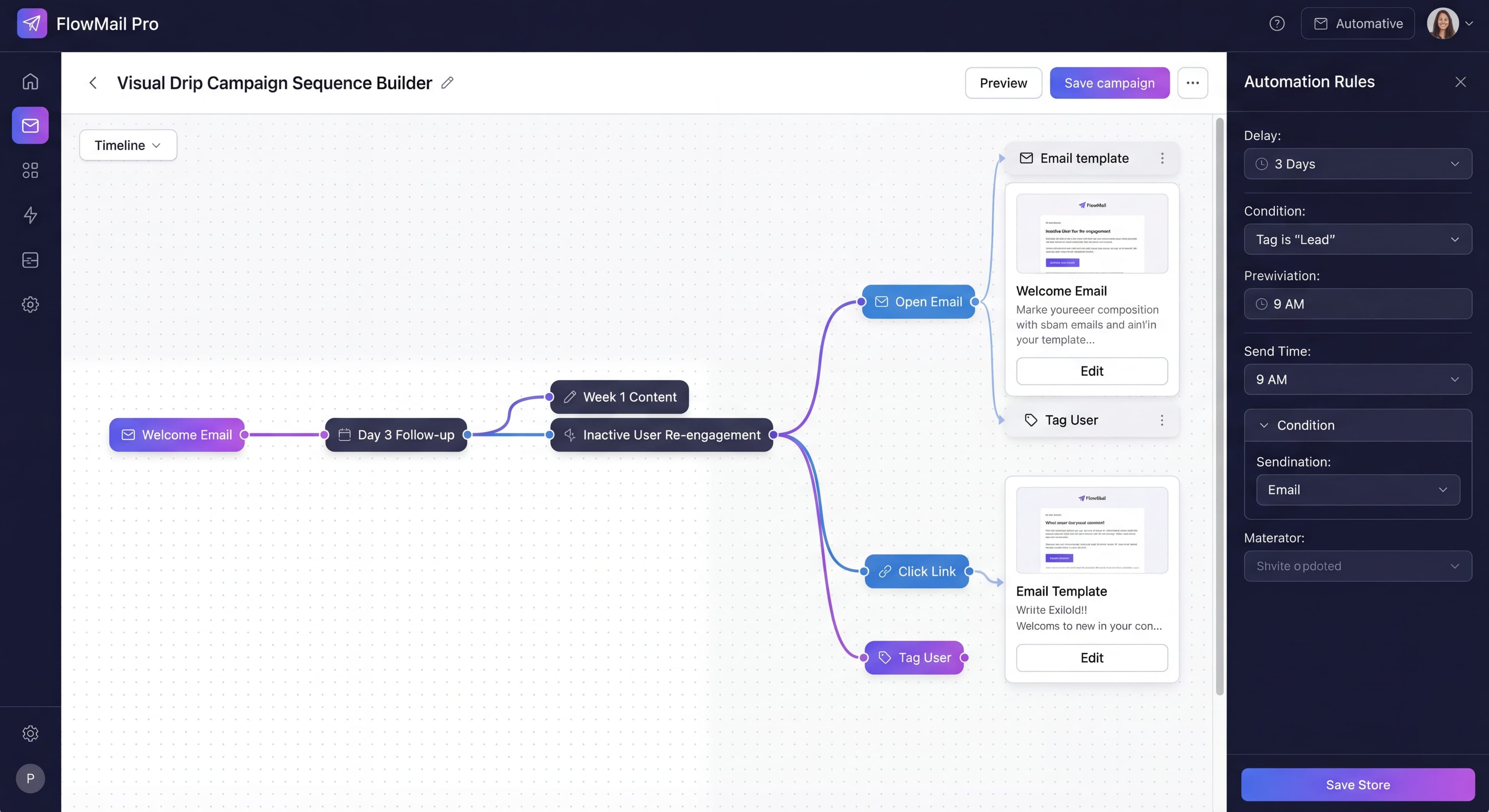

In-app onboarding can only help users who are actually in the app. What about the 40-60% of trial users who sign up and never come back? That's where onboarding emails come in.
An onboarding email sequence extends your reach beyond the product, bringing users back when they drift away and reinforcing what they learned during initial sessions. Combined effectively with in-app guidance, email creates a more complete onboarding system.
Here's how to build email sequences that actually drive activation.
Explaining the same things?
Create step-by-step guides that reduce support emails and help users self-serve with Glitter AI.
Email's Role in Onboarding
What Email Does Well
Re-engagement:
Reaching users who haven't returned to your product.
Reinforcement:
Strengthening lessons learned in-app.
Context Delivery:
Providing information better consumed outside the product (case studies, tips, resources).
Urgency Creation:
Deadline reminders, time-sensitive opportunities.
Relationship Building:
Human connection that pure in-app can't provide.
What Email Can't Do
Replace In-App:
Email can't substitute for in-product education and guidance.
Force Action:
Users must still return to the product to complete actions.
Provide Context:
Can't show contextual guidance at the moment of need.
The Statistics
- 84% of SaaS companies use email onboarding campaigns
- Behavioral emails have 300%+ higher open rates than generic
- Users who engage with onboarding emails activate at 2-3x rates
The data strongly supports email's role in successful onboarding programs. Zigpoll research on onboarding drip campaign design reveals that these automated sequences have become essential for onboarding new users effectively. They deliver targeted messages triggered by specific user actions or timed intervals, getting the right content to users at the right moment. When executed well, drip campaigns nurture engagement, educate users on product features, and significantly reduce early churn. The 300% higher open rate advantage that behavioral emails enjoy over generic scheduled messages comes from their relevance and timing. Receiving an email about exactly what you just did (or didn't do) in a product feels helpful rather than spammy. Drip research shows that automated workflows achieve a 61% email open rate compared to just 51% for single email campaigns. The difference in click-through rates is even more dramatic: workflow emails generate a 5% CTR versus just 2% for one-off campaigns. The 2-3x activation rate advantage for users who engage with onboarding emails validates the whole approach. Email extends your onboarding reach to users who might otherwise disengage, bringing them back to experience value.
Email Sequence Structure
The Core Sequence
Email 1: Welcome (Immediate)
Confirm signup, set expectations, deliver quick win.
Email 2: Getting Started (Day 1)
Guide first key action if not completed.
Email 3: Feature Introduction (Day 3)
Introduce next logical feature or capability.
Email 4: Value Reinforcement (Day 5)
Show what's possible, social proof.
Email 5: Check-In (Day 7)
Ask if they need help, re-engage if inactive.
Email 6-8: Feature Depth (Days 10-14)
Introduce additional features based on engagement.
Email 9-10: Conversion (End of Trial)
Trial ending reminders, upgrade CTAs.
Timing Considerations
Early Frequency:
More frequent in first week (critical window).
Spacing:
Avoid consecutive days after first 3 days.
Trigger-Based:
Behavioral triggers can override schedule.
Respect Unsubscribes:
Easy opt-out, honor preferences.
Trigger-Based vs Time-Based
Time-Based Emails
Sent based on elapsed time since signup.
Day 1: "Here's how to get started"
Day 3: "Have you tried X feature?"
Day 7: "You're halfway through your trial"
Pros:
- Simple to implement
- Predictable sequence
- Guaranteed coverage
Cons:
- Ignores actual user behavior
- Can be irrelevant (sending "get started" to active users)
- One-size-fits-all
Time-based email sequences represent the traditional approach to onboarding automation. They send messages based purely on calendar days since signup regardless of user activity. According to Mailmodo research on drip campaigns, a drip email campaign consists of automated pre-scheduled emails sent to specific segments based on timeline triggers like 3 days after signup, 7 days after trial start, or 14 days before renewal. The simplicity of time-based sequences makes them easy to set up and maintain. You define a schedule once and every user follows the same path. This predictability ensures everyone gets covered. No user slips through the cracks due to inactivity or unusual behavior patterns. The downside is that this one-size-fits-all approach creates relevance problems. Sending a "get started" email to a user who has already completed onboarding and is actively using your product creates frustration and damages your brand perception. Sending advanced feature tips to users who haven't completed basic setup wastes the opportunity to guide them through foundational steps. Time-based sequences perform adequately for average users but fail to optimize for either highly engaged power users or struggling inactive users who need different messaging at different times.
Trigger-Based Emails
Sent based on user actions (or inaction).
After First Login: "Great start! Here's what to do next"
After Feature Use: "You just discovered X. Here's how to get more from it"
After 3 Days Inactive: "We noticed you haven't logged in. Need help?"
Pros:
- Highly relevant
- Responds to actual behavior
- Better engagement rates
Cons:
- More complex to implement
- Requires robust event tracking
- Gaps in coverage possible
Behavioral triggers elevate email onboarding from generic messaging to personalized guidance that responds to each user's unique journey through your product. Research shows that behavioral triggers typically outperform scheduled emails in engagement rates by significant margins. According to Customer.io documentation on onboarding campaigns, setting automation rules to send messages triggered by specific user actions tracked via analytics creates highly contextual communications. For example, if a user hasn't tried a key feature within 3 days, sending a "Did you know?" tip email provides exactly the nudge they need exactly when they need it. Companies like Slack and Airbnb have mastered behavioral email sequences. Slack's onboarding doesn't just welcome users but actively teaches them how to use core features through a series of short, actionable emails triggered by their actual usage patterns. For SaaS clients, designing onboarding sequences that guide new users to those critical "aha moments" when they first experience real value is key. Salesloop's drip campaign research found that one client saw their user activation rate jump from 23% to 41% after implementing a strategic behavioral onboarding sequence. The power of behavioral triggers lies in making each communication feel personally relevant rather than part of a mass broadcast. That dramatically improves open rates, click-through rates, and most importantly, the likelihood that users take the desired action.
Hybrid Approach (Recommended)
Combine both approaches:
Time-based backbone:
Ensure all users receive core messages.
Trigger-based overrides:
Skip or modify based on behavior.
Suppression rules:
Don't send irrelevant content to active users.
Email Content Types
Welcome Emails
Purpose: Confirm signup, deliver first value, set expectations.
Key Elements:
- Thank user for signing up
- One clear next step
- Expectation setting for future emails
- Quick win opportunity
Example:
Subject: Welcome to [Product] - here's your first step

Hi [Name],

Thanks for signing up for [Product].

Your single task for today: [One specific action]

This takes about 2 minutes and will [benefit].

[CTA Button: Get Started]

Over the next two weeks, I'll send you tips to help you
get the most from [Product]. Reply to any email if you
have questions—I read every reply.

[Founder Name]
Activation Emails
Purpose: Drive specific actions that correlate with activation.
Key Elements:
- One specific action
- Clear benefit of taking action
- Step-by-step if needed
- Strong CTA
Example:
Subject: Your first [deliverable] in 3 steps

Hi [Name],

Ready to create your first [deliverable]?

Here's how (takes 5 minutes):

1. [Step one]
2. [Step two]
3. [Step three]

Once you've done this, you'll be able to [benefit].

[CTA Button: Create Your First [Deliverable]]

Questions? Just reply to this email.

[Name]
Re-Engagement Emails
Purpose: Bring back users who've gone inactive.
Key Elements:
- Acknowledge absence (not guilt)
- Provide reason to return
- Make it easy
- Offer help
Example:
Subject: Did we lose you?

Hi [Name],

I noticed you haven't logged in for a few days.

Getting started with new tools can be tricky. If you're
stuck on something, I'd love to help.

Here are the three most common questions I get:

- [Common question 1] - [Answer/link]
- [Common question 2] - [Answer/link]
- [Common question 3] - [Answer/link]

If you're waiting on something specific, or if [Product]
isn't the right fit, I'd appreciate knowing so I can
improve things for others.

[CTA Button: Log Back In]

[Name]
Feature Introduction Emails
Purpose: Introduce capabilities beyond basics.
Key Elements:
- One feature focus
- Use case / benefit
- How to access
- Example of success
Example:
Subject: Did you know you can [capability]?

Hi [Name],

Now that you've [previous action], you might want
to try [feature].

With [feature], you can:
- [Benefit 1]
- [Benefit 2]
- [Benefit 3]

Here's how to get started:
[Brief instructions or gif/screenshot]

[Company Name] uses this to [result]. You can too.

[CTA Button: Try [Feature]]
Social Proof Emails
Purpose: Build confidence through examples and testimonials.
Key Elements:
- Relevant customer example
- Specific results
- Relatable context
- Implicit encouragement
Example:
Subject: How [Customer] achieved [result]

Hi [Name],

I wanted to share how one of our customers, [Customer],
uses [Product].

[Brief story with specific numbers/results]

The key for them was [specific tactic/feature].

You can do the same thing:
[CTA Button: Try It Yourself]

More stories here: [link to case studies]

[Name]
Trial Ending Emails
Purpose: Convert trial users to paid.
Key Elements:
- Trial status clear
- Value they'd lose
- Easy upgrade path
- Help offer
Example:
Subject: 3 days left in your trial

Hi [Name],

Your [Product] trial ends in 3 days.

Here's what you've built so far:
- [Personalized usage data if available]
- [Projects/items created]
- [Time saved/value delivered]

To keep access to everything you've created, upgrade
before [date]:

[CTA Button: Upgrade Now]

If you have questions about pricing or need more time,
just reply—I'm happy to help.

[Name]
Writing Effective Onboarding Emails
Subject Lines
Best Practices:
- Under 50 characters
- Specific, not generic
- Curiosity or benefit-driven
- Avoid spam triggers
Good Examples:
- "Your first [deliverable] in 3 steps"
- "Did you know you can [capability]?"
- "Quick tip: [specific tactic]"
- "3 days left in your trial"
Avoid:
- "Welcome!" (generic)
- "Newsletter #1" (boring)
- "URGENT: Act now!" (spam)
- "Quick question" (misleading)
Body Copy
Keep It Short:
Respect time. Get to the point.
One Goal per Email:
Multiple CTAs dilute effectiveness.
Scannable Format:
Short paragraphs, bullets, clear structure.
Personal Tone:
Write like a person, not a corporation.
Mobile-Friendly:
Majority opens on mobile. Design accordingly.
CTAs
Single, Clear CTA:
One primary action per email.
Button > Text Link:
Buttons get higher clicks.
Action-Oriented:
"Create Your First Project" > "Click Here"
Above the Fold:
Don't bury the CTA.
Personalization
Name Personalization:
Basic but effective (when you have it).
Behavior Personalization:
Reference what they've done or haven't done.
Segment Personalization:
Different content for different user types.
Dynamic Content:
Show relevant features based on usage.
Coordinating Email and In-App
Don't Duplicate
If users complete actions in-app, suppress related emails.
Example:
User creates first project → Don't send "create your first project" email.
Reinforce, Don't Replace
Email should complement in-app, not replicate it.
In-App: Shows them how to do something
Email: Reminds them why they should
Consistent Messaging
Same value propositions, similar language, aligned guidance.
Knowledge stuck in silos?
Create step-by-step guides that share expertise across your entire team with Glitter AI.
Track Cross-Channel
Measure how email engagement affects in-app behavior.
Measuring Email Performance
Key Metrics
Delivery Metrics:
- Delivery rate (should be >95%)
- Bounce rate (hard vs soft)
Engagement Metrics:
- Open rate (benchmark: 20-30% for onboarding)
- Click rate (benchmark: 3-5%)
- Reply rate (qualitative engagement)
Outcome Metrics:
- Action completion after email
- Return visits attributed to email
- Conversion rate by email engagement
Analyzing Sequences
Sequence Completion:
What % make it through all emails?
Drop-Off Points:
Where do unsubscribes happen?
Highest Performers:
Which emails drive most action?
Attribution:
Which emails correlate with activation?
A/B Testing
What to Test:
- Subject lines
- Send timing
- Content length
- CTA copy and placement
- Personalization approaches
How to Test:
- One variable at a time
- Sufficient sample size
- Statistical significance
- Consistent measurement
Knowledge stuck in silos?
Create step-by-step guides that share expertise across your entire team with Glitter AI.
Common Email Mistakes
Mistake 1: Too Many Emails
Problem: 10+ emails in first week
Result: Unsubscribes, annoyance
Fix: 5-7 emails in first 2 weeks maximum
Mistake 2: Generic Content
Problem: Same emails to everyone regardless of behavior
Result: Irrelevance, low engagement
Fix: Behavioral triggers and segmentation
Mistake 3: Feature Dumps
Problem: Listing all features without context
Result: Overwhelming, low action
Fix: One feature, one benefit, one CTA
Mistake 4: No Personality
Problem: Corporate, impersonal tone
Result: Ignored, feels automated
Fix: Write like a helpful person
Mistake 5: Poor Mobile Experience
Problem: Long paragraphs, tiny buttons
Result: Bad experience for majority of readers
Fix: Design mobile-first
Mistake 6: Ignoring Replies
Problem: "No-reply" email addresses
Result: Missed engagement opportunity
Fix: Encourage and respond to replies
Email Tools for Onboarding
Customer Messaging Platforms
Customer.io:
Strong behavioral triggering, good for complex sequences.
Intercom:
Email + in-app messaging in one platform.
Drip:
E-commerce focused but works for SaaS.
Marketing Automation
HubSpot:
Full marketing suite including email automation.
ActiveCampaign:
Strong automation capabilities.
Mailchimp:
Simpler but effective for basic sequences.
Integrated with DAPs
Userpilot:
Email capabilities alongside in-app.
Appcues:
Integrates with email tools for coordination.
Selection Criteria
Behavioral Triggering:
Can you trigger based on product events?
Segmentation:
Can you segment by user attributes and behavior?
Integration:
Does it work with your analytics and product?
Coordination:
Can you suppress based on in-app actions?
Building Your Email Sequence
Step 1: Map Your Activation Journey
Identify key actions on the path to activation.
Step 2: Define Triggers
What user behaviors (or lack thereof) should trigger emails?
Step 3: Write Core Sequence
5-7 emails covering the trial period.
Step 4: Add Behavioral Variations
Suppression rules and trigger-based modifications.
Step 5: Test and Measure
Start sending, measure results, iterate.
Step 6: Optimize Continuously
Regular review and improvement based on data.
Users not activating?
Build SOPs that walk users through activation steps and drive engagement with Glitter AI.
The Bottom Line
User onboarding emails extend your reach beyond the product, bringing users back and reinforcing value. The best sequences combine time-based structure with behavioral intelligence, delivering relevant content at the right moment.
Key Principles:
- Complement in-app guidance, don't duplicate it
- One goal per email
- Behavior-based triggers outperform schedules
- Keep it short and actionable
- Measure outcomes, not just opens
Email won't save bad onboarding, but it will amplify good onboarding by making sure your guidance reaches users wherever they are.
Continue learning: Reducing Onboarding Friction and A/B Testing Onboarding.
Frequently Asked Questions
How many emails should be in an onboarding drip campaign?
A typical onboarding email sequence should include 5-7 emails over the first 2 weeks, with more frequent emails in the first week. Avoid sending more than 10 emails in the first week as this leads to unsubscribes and annoyance.
What is the difference between trigger-based and time-based onboarding emails?
Time-based emails are sent based on elapsed time since signup regardless of behavior. Trigger-based emails are sent based on user actions or inaction. A hybrid approach works best, using time-based emails as a backbone with behavioral triggers to skip or modify messages.
What is a good open rate for onboarding emails?
The benchmark open rate for onboarding emails is 20-30%, with good rates at 30-40% and excellent rates above 40%. Behavioral emails that respond to user actions have 300% higher open rates than generic time-based sequences.
How do you write effective activation emails?
Focus on one specific action per email with a clear benefit, use action-oriented CTAs like 'Create Your First Project' instead of 'Click Here', keep copy short and scannable, and include step-by-step instructions when needed.
How should onboarding emails coordinate with in-app guidance?
Emails should complement in-app onboarding, not duplicate it. Use suppression rules to skip emails when users complete actions in-app. Email explains why users should take action while in-app shows how. Track cross-channel engagement to measure combined effectiveness.