User Segmentation for Onboarding: Personalization at Scale
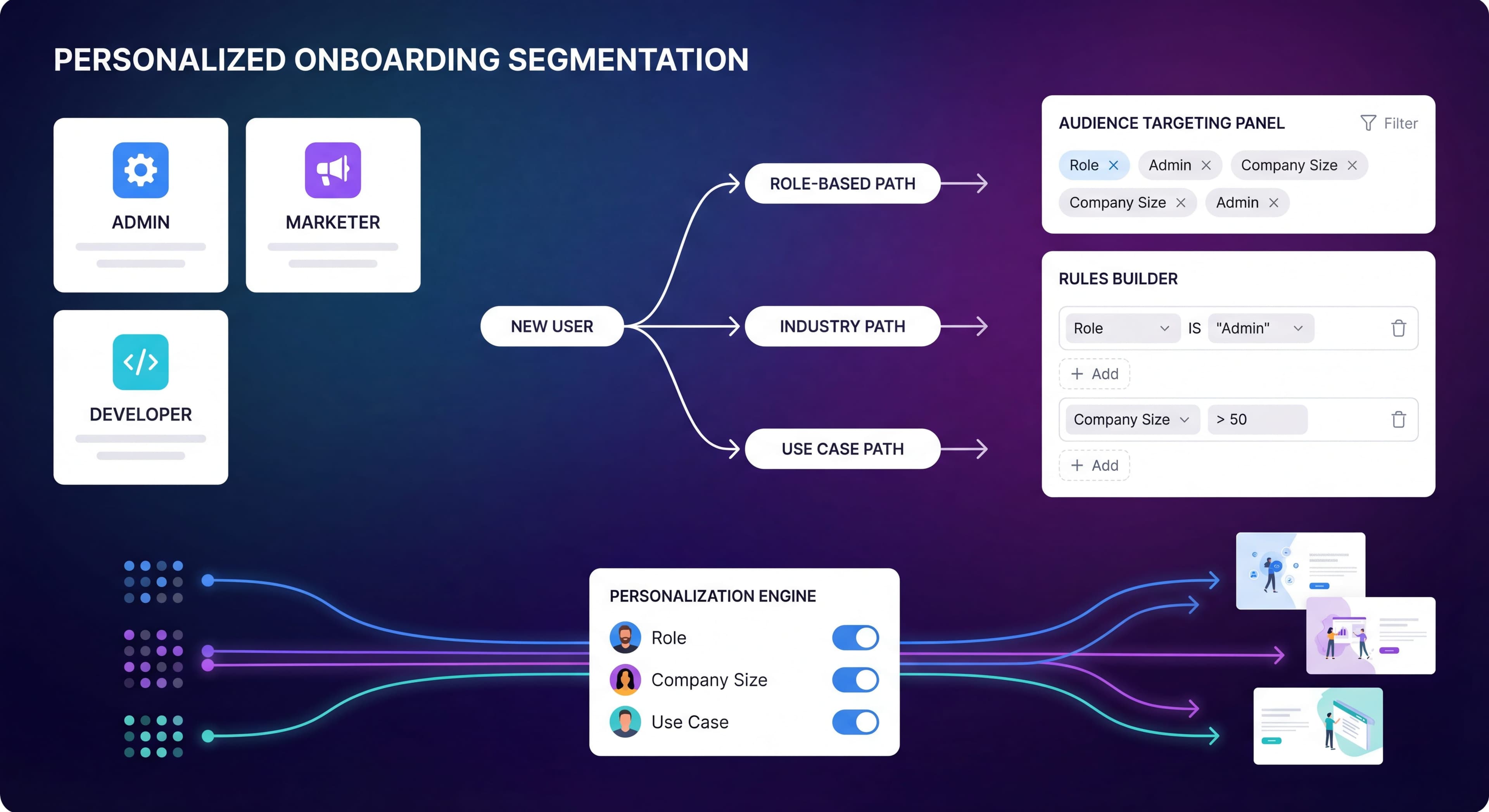

Not all users are the same. A marketing manager has different needs than a developer. A startup founder has different priorities than an enterprise admin. Yet most onboarding treats everyone identically, which is a problem.
User segmentation lets you create relevant experiences at scale. Instead of one-size-fits-all onboarding, you deliver targeted guidance that actually resonates with each user's situation. It's onboarding personalization without requiring individual customization for every person.
This guide covers how to segment users effectively and build personalized onboarding experiences that work.
Onboarding too generic?
Create step-by-step guides tailored to each user segment and accelerate time to value with Glitter AI.
Why Segment Onboarding?
The Problem with Generic Onboarding
Generic onboarding creates mismatches that frustrate users and hurt activation rates. When a marketing manager encounters developer-focused API documentation during onboarding, they immediately feel like the product isn't for them. When an enterprise admin gets startup-appropriate guidance that skips compliance features, they waste time hunting for functionality they need. Power users get forced through basic training on concepts they mastered years ago. Beginners feel overwhelmed by advanced features they're not ready for.
According to Appcues' research on segmentation and personalization, identifying key user segments is a cornerstone of tailored onboarding. Not all users are the same. They come with different backgrounds, needs, and expectations. The mismatches have real consequences: irrelevant content gets ignored, wrong features get highlighted, and users conclude the product isn't for them.
Research from ProductFruits' analysis of user segmentation shows that 74% of customers might switch to another option if they find the onboarding process too tricky. Getting onboarding personalization right from the start matters.
The Impact of Personalization
The data on personalized onboarding is pretty compelling. Companies that segment versus show generic onboarding see activation rates increase by 25-40%, engagement improve by 30-50%, and time to value decrease by 20-30%. These aren't marginal gains. They represent the difference between mediocre and exceptional onboarding.
UserGuiding's segmentation guide notes that over 60% of users churn when a company delivers non-personalized experiences. SaaS companies with personalized onboarding can reduce churn by up to 40%. The research also shows that 82% of users expect onboarding tailored to their role and goals, and 74% prefer onboarding that adapts to their behavior (like skipping steps they've already completed).
Real-world results back this up. SocialPilot reported a 20% increase in activation rates and 15% decrease in churn after implementing personalized onboarding. These improvements compound over the customer lifetime. Higher activation leads to better retention, which leads to expansion revenue and referrals.
Personalization Spectrum
Level 1: No Segmentation
Same onboarding for everyone.
Level 2: Basic Segmentation
2-4 paths based on primary attributes.
Level 3: Multi-Factor Segmentation
Multiple dimensions combined for targeting.
Level 4: Individual Personalization
Dynamic, AI-driven individual experiences.
Most products should aim for Level 2-3. Level 4 requires significant data and infrastructure.
Segmentation Approaches
Role-Based Segmentation
Segment by user's job function or responsibility.
Common Role Segments:
- Admin vs End User
- Executive vs Individual Contributor
- Technical vs Non-Technical
- Manager vs Team Member
Why It Works:
- Clear, easy to collect
- Strong correlation with needs
- Intuitive for users to self-select
Example:
Marketing automation tool:
- Marketer: Campaign creation focus
- Sales: Lead handoff focus
- Admin: Integration and settings focus
Use Case Segmentation
Segment by what users want to accomplish.
Common Patterns:
- Problem they're solving
- Goal they're pursuing
- Workflow they're implementing
Why It Works:
- Directly relevant to user needs
- Can skip irrelevant features
- Faster time to value
Example:
Project management tool:
- Personal productivity
- Team collaboration
- Client project management
Company Size Segmentation
Segment by organization characteristics.
Common Segments:
- Startup (1-10)
- SMB (11-100)
- Mid-Market (101-1000)
- Enterprise (1000+)
Why It Works:
- Different scale needs
- Different complexity tolerance
- Different feature relevance
Example:
HR software:
- Startup: Basic setup, simple workflows
- Enterprise: Compliance, integrations, permissions
Experience Level Segmentation
Segment by familiarity with product or category.
Common Segments:
- First time using this category
- Switching from competitor
- Upgrading from free tier
- Returning after absence
Why It Works:
- Appropriate depth of education
- Skip basics for experienced users
- Help switchers with differences
Behavioral Segmentation
Segment by actions taken (or not taken).
Common Patterns:
- Signup behavior
- Early usage patterns
- Feature engagement
- Struggle signals
Why It Works:
- Based on actual behavior
- Adapts to user actions
- Can intervene at right moments
Collecting Segmentation Data
Effective segmentation depends on the quality of data you collect. According to Userpilot's personalization guide, personalized onboarding requires either "declared data" (information users explicitly volunteer) or "inferred data" (information systematically generated from behavior). The trick is collecting meaningful data without creating friction that kills conversion rates.
At Signup
Welcome surveys are the most direct way to collect segmentation data. Ask 2-3 targeted questions during or right after signup when users are engaged and willing to share. Best practices: limit yourself to 3 questions max since each additional one reduces completion rates, provide clear options rather than open text fields, explain why you're asking, and make questions skippable if possible.
Example questions that drive meaningful user segmentation onboarding: What best describes your role? (Marketing, Sales, Product, Developer, Other). What's your main goal? (Increase conversions, Reduce churn, Improve engagement, Learn the tool). How many people are on your team? (Just me, 2-10, 11-50, 50+). The example from Wrike's welcome survey shows how segmenting by company and team size lets them show relevant materials, improving time-to-value by emphasizing features that actually matter.
The limitations of declared data: users skip questions if not clearly required, self-reporting bias is real (users select what they think they should), and each question before product access hurts conversion. Research from FasterCapital on leveraging user segmentation notes that declared data captures preferences and intentions that behavioral data alone can't reveal.
From Account Data
Account data provides segmentation without requiring user input. Available sources: email domain for company identification (john@microsoft.com suggests enterprise, john@gmail.com suggests individual or small business), signup source (organic search, paid ads, referrals), plan type (free trial, paid, specific tier), and company enrichment through services like Clearbit that append company size, industry, and funding based on email domain.
Best practices: enrich where possible since appending company data costs pennies but provides valuable segmentation, use company data carefully since assumptions based on email domain can be wrong (consultants using client domains, contractors, etc.), and avoid over-assuming about user roles based solely on external signals. The advantage is zero user friction since collection happens automatically. But accuracy varies and some signals mislead.
From Behavior
Behavioral segmentation uses actual product usage patterns to infer user types and needs. Early actions reveal a lot: which features users explore first shows their priorities, time spent exploring shows engagement depth, help content accessed reveals confusion points, and errors encountered show technical proficiency. Ongoing signals provide dynamic segmentation: feature usage patterns show what users value, session frequency indicates engagement level, and depth reveals whether users are casual samplers or power users in training.
According to UserGuiding's behavioral segmentation research, if you want to increase retention, behavioral segmentation might make the most sense. For example, noticing a drop-off after two weeks lets you segment by onboarding completion rate, identify users at churn risk, and intervene with personalized re-engagement.
Best practices: define clear signals in advance (not ad-hoc pattern recognition), wait for sufficient data before making decisions since early behavior may not represent long-term patterns, and combine behavioral data with declared data for richer onboarding by user type. Headspace does this well by letting users self-select their path after signing up, then recommending exercises based on their choices, creating a personalized experience that evolves with usage.
Building Segmented Experiences
Step 1: Define Segments
Start Simple:
Begin with 2-3 segments maximum.
Good First Segmentation:
- Admin vs End User
- Primary use case (2-3 options)
- Company size (2-3 tiers)
Avoid:
- Too many segments
- Overlapping segments
- Hard-to-collect criteria
Step 2: Map Journeys
For each segment, define:
Activation Goal:
What does success look like?
Key Features:
What should they discover first?
Common Obstacles:
What might block them?
Optimal Path:
What's the fastest route to value?
Step 3: Create Content Variations
What to Customize:
Product Tours:
- Different features highlighted
- Different order
- Different depth
Checklists:
- Segment-specific tasks
- Relevant milestones
- Appropriate complexity
Email Sequences:
- Use case-specific content
- Role-appropriate examples
- Relevant tips
Resource Recommendations:
- Help content by role
- Tutorials by use case
- Examples by industry
Step 4: Implement Logic
Targeting Rules:
- If role = Admin AND company = Enterprise → Flow A
- If use case = Personal productivity → Flow B
- If behavior indicates struggle → Intervention C
Tool Capabilities:
Most onboarding platforms support:
- User attribute targeting
- Behavioral triggers
- Segment combinations
Personalization Examples
Role-Based Example: Analytics Tool
Data Analyst Onboarding:
- Quick data connection setup
- Query builder introduction
- Visualization options
- Sharing and scheduling
Marketing Manager Onboarding:
- Pre-built marketing dashboards
- Key metric explanations
- Report customization
- Team sharing features
Executive Onboarding:
- High-level dashboards
- Key business metrics
- Mobile app setup
- Notification preferences
Use Case Example: Communication Tool
Internal Communication:
- Team channels setup
- Direct messaging
- File sharing
- Integrations with internal tools
Client Communication:
- Client channel creation
- Guest access settings
- Professional appearance
- Client-safe features
Company Size Example: CRM
Startup (<10 people):
- Simple contact import
- Basic pipeline setup
- Email integration
- Activity tracking
Enterprise (1000+):
- Integration configuration
- Custom fields and processes
- Team structure and permissions
- Compliance settings
Measuring Segmented Onboarding
Same questions over and over?
Create self-serve documentation that empowers users to help themselves with Glitter AI.
Per-Segment Metrics
Track separately for each segment:
Activation Rate:
Are some segments activating better?
Time to Value:
Which segments reach value fastest?
Drop-Off Points:
Where does each segment struggle?
Feature Adoption:
Which features resonate with which segments?
Comparative Analysis
Questions to Answer:
- Which segment performs best?
- Where do segments diverge?
- Which customizations have impact?
- Are segments correctly defined?
Refinement Signals
Segment Working Well:
- Higher activation than average
- Positive feedback
- Expected feature usage
Segment Needs Work:
- Below-average activation
- Unexpected drop-offs
- Wrong feature engagement
Segment Mis-defined:
- Users don't fit options
- Self-selection confusion
- Overlap in behavior
Advanced Personalization
Multi-Factor Targeting
Combine multiple factors:
Example:
- Admin + Enterprise + Technical → Advanced configuration flow
- End User + SMB + Non-Technical → Guided simple flow
Implementation:
- Define priority rules
- Handle edge cases
- Test combinations
Dynamic Personalization
Adjust based on ongoing behavior:
Example:
User selected "beginner" but navigates like expert → Skip basic guidance.
Implementation:
- Define behavioral signals
- Create adjustment rules
- Test thoroughly
AI-Powered Personalization
Machine learning for individual optimization:
Current State:
- Userflow offers AI-powered suggestions
- Limited but growing capability
- Mostly prediction-based
Practical Application:
- Predict likely segment
- Suggest next best action
- Optimize timing
Same questions over and over?
Create self-serve documentation that empowers users to help themselves with Glitter AI.
Common Segmentation Mistakes
Mistake 1: Too Many Segments
Problem: 10+ segments with small populations
Result: Hard to maintain, insufficient data, inconsistent quality
Fix: Start with 2-3, expand only with evidence
Mistake 2: Wrong Segmentation Criteria
Problem: Segments don't predict behavior
Result: Personalization doesn't improve outcomes
Fix: Validate segments against behavior data
Mistake 3: Static Segmentation
Problem: User assigned once, never updated
Result: Outdated personalization, missed opportunities
Fix: Allow segment evolution based on behavior
Mistake 4: Over-Personalization
Problem: Every element customized
Result: Maintenance nightmare, inconsistency
Fix: Personalize high-impact elements only
Mistake 5: Assumption-Based Segments
Problem: Segments based on gut feel
Result: May not reflect real user differences
Fix: Validate with data before investing
Implementation Checklist
Phase 1: Foundation
- Audit current onboarding performance
- Identify user differences in behavior
- Define 2-3 initial segments
- Determine data collection method
Phase 2: Build
- Create welcome survey questions
- Design segment-specific flows
- Build content variations
- Configure targeting rules
Phase 3: Launch
- Test all segment paths
- Verify targeting accuracy
- Monitor initial performance
- Gather user feedback
Phase 4: Optimize
- Analyze per-segment metrics
- Identify improvement opportunities
- Refine segment definitions
- Add segments if validated by data
Tool Capabilities for Segmentation
What to Look For
User Attribute Targeting:
- Custom attributes
- Company data
- Plan information
Behavioral Targeting:
- Event-based triggers
- Feature usage
- Engagement patterns
Segment Management:
- Segment creation
- Combination logic
- Unlimited segments (vs limits)
Platform Comparison
Appcues:
Segment limits on lower tiers, unlimited on Growth.
Userpilot:
Unlimited segments across tiers.
Pendo:
Strong segmentation with analytics integration.
UserGuiding:
Segments included in most plans.
Always repeating explanations?
Create step-by-step SOPs once and share them across all your user segments with Glitter AI.
The Bottom Line
Segmentation isn't about creating perfect onboarding personalization for everyone. It's about ensuring relevant experiences for different user types. Good segmented onboarding shows users what matters to them, skips what doesn't, and guides them to success faster.
Key Principles:
- Start simple with 2-3 segments
- Use data you can reliably collect
- Focus on meaningful differences
- Measure and validate impact
- Iterate based on evidence
The goal is relevance, not personalization for its own sake. If your segments help users reach value faster, they're working. If they don't, simplify and try again.
Continue learning: Progressive Onboarding Strategies and Onboarding A/B Testing.
Frequently Asked Questions
What is onboarding personalization and why does it matter?
Onboarding personalization delivers targeted guidance based on user segments rather than one-size-fits-all flows. Segmented onboarding achieves 25-40% higher activation rates, 30-50% higher engagement, and 20-30% faster Time to Value compared to generic experiences.
How should you segment users for personalized onboarding?
Common segmentation approaches include role-based (admin vs end user), use case (what they want to accomplish), company size (startup vs enterprise), experience level (first-time vs switching from competitor), and behavioral segmentation based on actual actions taken.
How many onboarding segments should you create?
Start with 2-3 segments maximum based on the most meaningful user differences. Too many segments become hard to maintain and lack sufficient data. Expand only when you have evidence that additional segments would improve outcomes.
How do you collect data for user segmentation?
Collect segmentation data through welcome surveys (2-3 questions maximum), account data like email domain and signup source, company enrichment services, and early user behavior patterns. Combine declared data with behavioral signals for best results.
What should you personalize in segmented onboarding?
Personalize high-impact elements: product tours showing different features and order, checklists with segment-specific tasks, email sequences with role-appropriate content, and resource recommendations by use case. Avoid over-personalizing every element, which creates maintenance nightmares.